Preference agents
A Preference Agent is the same job as a preference page done as a conversation instead of a form. The screen's own subtitle says it plainly: AI agents that capture preferences in conversation. The contact chats with an assistant, the assistant asks for the same core preferences and core contact fields a page would have shown, and what the contact says is written to the same Contact Preference records.
Agents are a newer surface than pages and they are not in the left menu yet. Reach them at
/preference-agents.
TODO(review): confirm whether preference agents are generally available, in beta, or behind a per-tenant flag, and whether they should appear in the left menu. That answer decides whether this page ships to customers as it stands.
Agent or page?
They write the same records and they raise webhook events on the same footing, so the choice is about the contact's experience and about who is allowed to see the thing.
| Preference page | Preference agent | |
|---|---|---|
| The contact sees | a form | a chat |
| You control the wording | fully, field by field | you write the welcome and farewell; the assistant phrases each question |
| Published by | saving it, then embedding or linking | Publish, which moves it from Draft to live |
| Gated by | the whitelist | the same whitelist, plus per-IP rate limits |
| Falls back to | nothing | an optional preference page linked at the bottom of the chat |
An agent can name a preference page as its fallback, so the two are complements rather than alternatives: offer the chat, and let anyone who would rather tick boxes go and do that.
The list
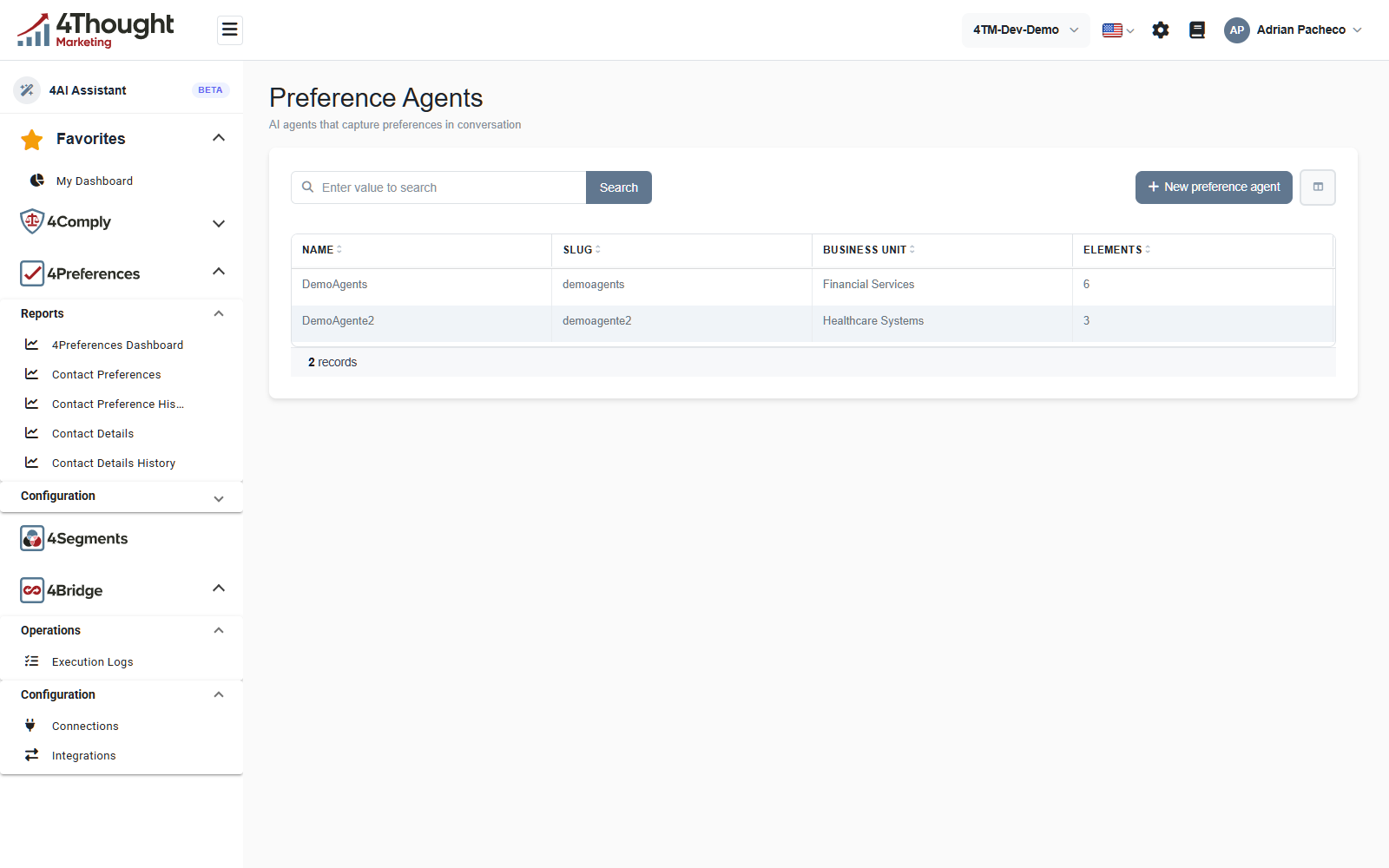
The columns are Name, Slug, Business Unit and Elements, and the demo tenant holds 2 records. Slug is the agent's public URL segment and has to be unique in the tenant; Elements is how many questions the agent asks.
+ New preference agent opens a short dialog that picks the questions, then takes you straight into the editor with Create & configure.
TODO(review): the agent list also defines Status and Modified columns that do not appear on screen at the default window width. Confirm whether they are meant to be visible or are hidden by the column picker by default.
The editor
The pencil on a row opens the agent. Everything about it lives on three tabs.
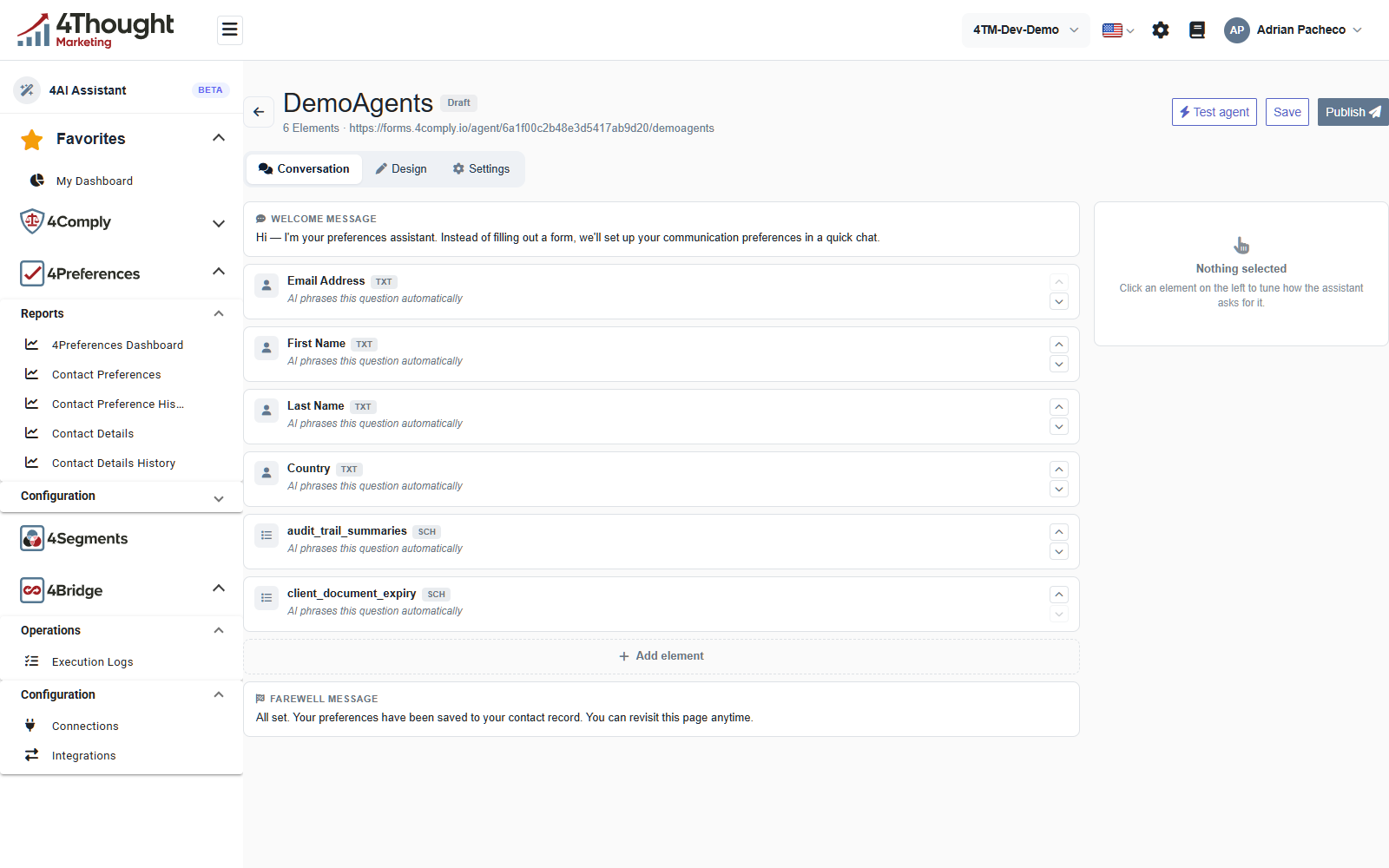
Under the agent's name is its state, Draft in the figure, and its public URL. The URL in the figure is illustrative: the host and the tenant identifier have been replaced with same-shaped stand-ins.
Conversation is the tab in the figure and the one that matters most.
- WELCOME MESSAGE is a fixed message, not generated. It is the first thing the contact reads, so it is where you say who you are and what the chat is for.
- Then one card per element, in the order the assistant will ask. Each card names the core
contact or core preference it collects and its type,
TXTfor a text field andSCHfor a single checkbox, and each says AI phrases this question automatically. The arrows on the right reorder them. Clicking one opens the panel on the right, which reads Nothing selected until you do: Click an element on the left to tune how the assistant asks for it. - + Add element adds another question.
- FAREWELL MESSAGE is the fixed message shown once the preferences are saved.
Design covers the look of the widget: an accent colour, an avatar, rounded or square bubbles, comfortable or compact spacing, and whether to show a progress indicator and a question count.
Settings covers behaviour. The assistant has a tone, a language (which can follow the contact's), and switches for whether it stays on topic, lets the contact skip a question, lets them look up what they already chose, and offers to unsubscribe them from everything. It also decides whether the conversation may write to the contact record at all, whether it may create a contact that does not exist yet, and which preference page is the fallback.
TODO(review): the Design and Settings tabs are described here from the agent record's own fields rather than from the screens, because documenting them properly means opening tabs on a saved agent and this pass stayed read-only. Re-shoot both tabs and check the labels before this page is published.
Draft, preview and live
An agent has two states, Draft and live, and Publish in the top right moves it from one to the other. A draft agent's public URL returns nothing useful to an ordinary visitor.
To see a draft before publishing it, use Test agent. That asks the API for a short-lived
preview token, which the public endpoints accept in a preview_token query parameter and
which lets a gated agent answer. The token is signed and expires, so it is not a way to
share a draft widely.
TODO(review): confirm the preview token's lifetime as configured in production. The default in the code is 15 minutes, but it is a server setting and the deployed value was not checked.
TODO(review): Test agent starts a real conversation against the deployed agent. Confirm whether a test conversation writes contact preferences, and if so, say so here, because the button reads like a dry run.
The public endpoints
An agent's widget talks to three endpoints, and none of them takes a credential.
| Endpoint | What it does |
|---|---|
GET /v1/preferenceagents/public/{tenantId}/{slug} |
returns the agent's public configuration |
POST /v1/preferenceagents/public/{tenantId}/{slug}/conversations |
starts a conversation and returns its id |
POST /v1/preferenceagents/public/conversations/{conversationId}/messages |
sends one message and gets the reply |
Two things stand in for authentication.
- The whitelist. The first two endpoints are checked against
Preference Whitelist, the same list that gates a
preference page's public render. An empty whitelist means open access; one enabled entry
means only matching callers get through, and everyone else gets a
403. - Rate limits. Starting a conversation and sending a message are both rate limited per
IP address. Over the limit the endpoint returns
429.
The message endpoint is deliberately not whitelist-checked. A conversation id can only exist because the start endpoint created it behind the whitelist gate, and the tenant and agent are read from the stored conversation rather than from anything the caller sends.
None of the three endpoints accepts a tenant_id header. The tenant comes from the route on
the first two, and from the conversation record on the third, so a caller cannot point an
anonymous request at a different tenant.
A conversation is not permanent. It has a cap on how many turns it may take, a cap on how long a single message may be, an inactivity timeout after which it is treated as expired, and an expiry after which the record itself is deleted.
TODO(review): confirm the production values for the turn cap, message length cap, inactivity timeout and conversation lifetime. All four are server settings and this page deliberately does not quote the code defaults.
What an agent writes
When a conversation finishes, the agent writes Contact Preferences and Contact Details
exactly as a page submission does, so everything in
Contact preferences applies. It then raises a
PreferenceAgentSubmit webhook event carrying the agent's id and name, the contact's email
address, and whether the contact asked to be unsubscribed. See
Integrations and webhooks.