Getting started with 4Preferences
4Preferences is a preference centre. It is where your contacts tell you how they want to hear from you and what they want to hear about, and it is where you keep that answer so the systems that send the messages can respect it.
It runs inside the 4Comply dashboard, on the same login, the same tenant and the same API. If you already use 4Comply you do not sign in anywhere else: a 4Preferences section appears in the left menu.
Preferences are not consent
4Comply and 4Preferences answer two different questions about the same person, and keeping them apart is the single most useful thing to understand before you configure anything.
| 4Comply | 4Preferences | |
|---|---|---|
| The question | May we contact this person at all? | How does this person want to be contacted, and about what? |
| The record | a Compliance Input, and the Permission derived from it | a Contact Preference |
| Why it exists | a legal basis you may have to prove | a promise to the contact you should keep |
| Where it lives | Compliance Inputs | Contact Preferences |
A contact can have consent on file and still want nothing but the quarterly newsletter, by email only. A contact can also withdraw consent, in which case nothing in 4Preferences matters any more: consent is the gate, preferences are the dial behind it.
The two are not sealed off from each other. A Core Preference Integration turns a preference change into a 4Comply compliance input, so an opt-in captured on a preference page can become part of the legal record. That is opt-in behaviour you configure per preference, not something that happens by default. See Integrations and webhooks.
Where it lives in the dashboard
Sign in to the dashboard as usual, then expand 4Preferences in the left menu. It has two groups.
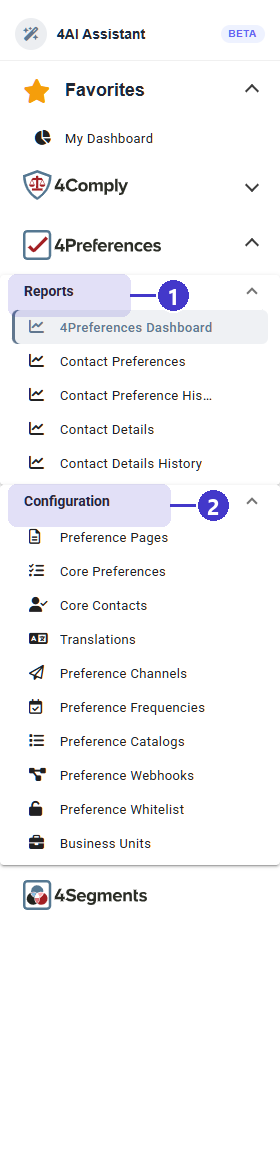
- Reports, the five read-only screens: 4Preferences Dashboard, Contact Preferences, Contact Preference History, Contact Details and Contact Details History. These are covered by Contact preferences and Reporting.
- Configuration, where everything else is built: Preference Pages, Core Preferences, Core Contacts, Translations, Preference Channels, Preference Frequencies, Preference Catalogs, Preference Webhooks, Preference Whitelist and Business Units.
Business Units at the bottom of the group is the same screen 4Comply uses, documented in Business Units. Almost everything in 4Preferences is scoped to a Business Unit, so if the tenant has more than one, decide which unit a preference belongs to before you create it.
Four screens exist in the product but are not in this menu. Until they are added, reach them by typing the path after the dashboard's address.
| Screen | Path | Guide |
|---|---|---|
| Preference Flow Report | /preference-flow-report |
Reporting |
| Preference Analytics | /preference-analytics |
Reporting |
| Preference Agents | /preference-agents |
Preference agents |
| Core Preference Integrations | /core-preference-integration |
Integrations and webhooks |
TODO(review): the menu entry for Core Preference Integration is commented out in the
dashboard source (libs/shared/src/lib/ui/sidenav/sidenav.component.ts), and Preference
Agents, Preference Analytics and Preference Flow Report were never added. Confirm which of
these four are meant to be reachable by customers so this page can stop listing URLs.
The order to build things in
Each step depends on the one above it, so working out of order means going back.
- Business Units. If you use them, create them first. A Core Preference and a Preference Page each belong to exactly one unit, and a page can only offer preferences from its own unit.
- Channels and frequencies. The mediums you send through (email, SMS) and the rhythms you offer (weekly, monthly). Both are plain lists, and both are reusable across every preference. See The preference catalog.
- Preference catalogs. The answer sets a question can offer, such as Yes/No or Days of Week. Only needed for preferences that offer a choice from a list. See The preference catalog.
- Core preferences and core contacts. The questions themselves. A core preference is a thing a contact opts into; a core contact is a detail you collect about them, such as their first name. See The preference catalog.
- Translations. Fill in the other languages once the questions are written, from one board rather than field by field. See Preference pages.
- A preference page. Assemble the questions into a page a contact can use, then embed it or link to it. See Preference pages.
- The whitelist. Decide which sites may render or embed the page. Leaving it empty means any site may. See Preference pages.
- Integrations and webhooks. Push what the contact chose into the systems that act on it. See Integrations and webhooks.
What you need to be allowed to do this
Reading a 4Preferences screen needs no special role. Creating, changing and deleting anything under Configuration needs the Admin or Config role, which the API checks on every one of those writes. Roles are managed on the Roles tab of Settings, described in Users.
TODO(review): the Roles tab offers a set of named 4Preferences permissions, but the
API's 4Preferences endpoints only ever check for the admin and config roles. Confirm
whether the finer-grained permissions are enforced anywhere before this page describes
them.
For developers
Everything in the dashboard is also an API call, and a preference page a contact fills in is just an unauthenticated POST to the same API. Start at API getting started.