Webhook triggers
A 4Bridge webhook is inbound. It gives one task a URL of its own, and a POST to that URL queues a run. That is the whole feature: it is a trigger, not a notification.
Use it when the other system knows something changed and you do not want to wait for the next scheduled run. A form submission, a record update, a nightly job in your own code finishing: each can call the URL and the sync happens within seconds instead of at the top of the hour.
If you are looking for 4Bridge calling you when a run finishes, that does not exist. The closest thing is Notification Settings, and it does not work in the current build. For outbound webhooks from the rest of the platform see 4Comply webhooks and 4Preferences webhooks.
Turning a task into a webhook task
Open the task, go to the Schedule step, and choose Webhook, described on its card as Trigger from an external system via URL.
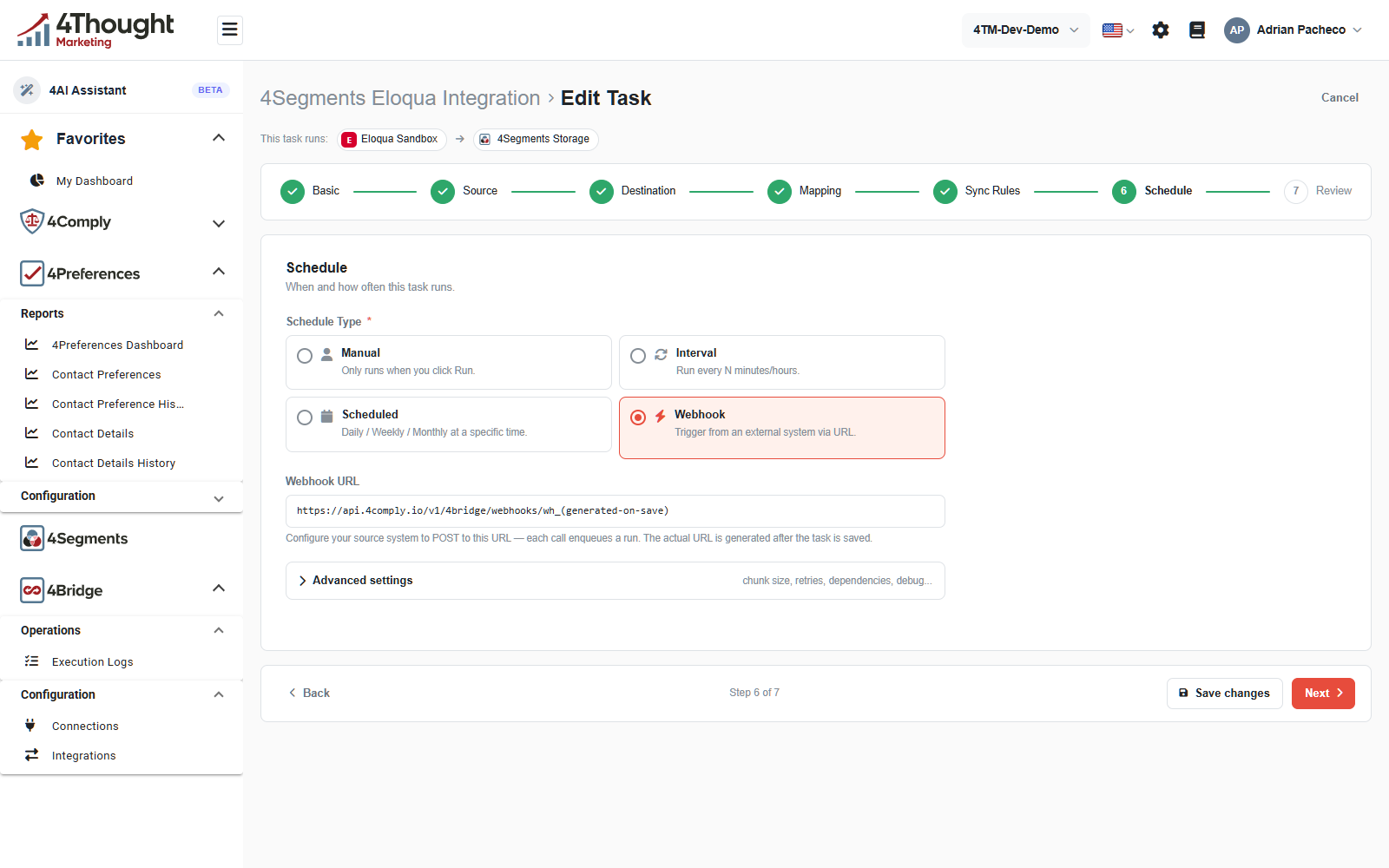
Webhook URL below it is read-only and shows a placeholder. The note explains the rest: point your source system at this URL, each call queues a run, and the real URL is generated once the task is saved.
A task can have Webhook or a schedule, not both. Choosing Webhook means the task never runs on a clock.
TODO(review): the placeholder URL in the field names a host that is not the API host, and its
path has one segment after /webhooks/ where the real route has two. Confirm what the field
should render before a customer copies it into another system.
TODO(review): the URL is generated on save, and the current build has no screen that shows a
saved task's webhook URL or its signing secret. Webhooks at /bridge-webhooks was
presumably meant to, and it calls a path the API does not serve, so it always reads No
webhooks configured; its Add Webhook button fails to load. Confirm where a customer
reads the URL and the secret, because today the only way is the API.
Doing it through the API
Until the screen works, the endpoint is the route.
Create one for a task:
curl -s -X POST https://api.4comply.io/v1/4bridge/webhooks/endpoints \
  -H "Authorization: Bearer sk_..." \
  -H "tenant_id: <your tenant id>" \
  -H "Content-Type: application/json" \
  -d '{ "taskId": "<the task id>", "sourceSystem": "marketo" }'
taskIdis the task this endpoint triggers.sourceSystemis a label of your own that becomes part of the URL. Keep it short and lowercase.- One endpoint per task. A second create for the same task is refused, with a message saying an endpoint already exists.
The response carries the endpoint's id, its endpointUrl, whether it is active, when it was
last triggered and how many times.
GET /v1/4bridge/webhooks/endpoints?taskId=<the task id> reads it back. The taskId query
parameter is required; without it the call is refused.
POST /v1/4bridge/webhooks/endpoints/{id}/regenerate-secret issues a new signing secret.
The old one stops working immediately, so change the caller at the same time.
Calling the URL
POST /v1/4bridge/webhooks/{sourceSystem}/{endpointToken}
The endpoint token is the secret part of the URL. Treat the whole URL as a credential: anyone who has it can queue a run of that task.
No credentials are sent. This endpoint is anonymous on purpose, because the caller is another system that cannot hold a 4Comply secret key. The token in the path and the signature header are what authenticate it.
A successful call answers immediately with the execution it queued:
{
  "execution_id": "0f5c9a2e-1d43-4b7a-9c8e-2a6b71d0f4c1",
  "status": "Queued"
}
That is the id to look up in Execution logs. The value above is illustrative, in the shape the endpoint returns.
| Response | What it means |
|---|---|
200 |
the run is queued |
401 |
a signature header was sent and did not match |
404 |
the token is wrong, or the endpoint has been deactivated |
400 |
the endpoint is valid but its task no longer exists |
500 |
4Bridge could not queue the run |
Note what a 200 does not tell you: whether the sync worked. It only says the run was
accepted. Everything after that is in the execution log.
Narrowing a run to specific records
The body can be empty, and the task then does whatever its source configuration says. If you know which records changed, name them:
{ "record_ids": ["12345", "12346", "12347"] }
4Bridge stores the raw body, pulls record_ids out if it is there, and passes it to the run.
Any other JSON you send is kept with the event but not acted on.
TODO(review): confirm what record_ids are expected to be for each connector. Source system
ids presumably, but a Marketo lead id and an Eloqua contact id are different shapes, and a
MySQL source has no obvious equivalent.
Verifying the call came from you
Each endpoint has a signing secret, issued when the endpoint is created. Sign the body and send the signature in a header:
X-Webhook-Signature: <base64>
The value is an HMAC-SHA256 of the exact request body, keyed with the endpoint's secret, and base64 encoded, not hex. Compute it over the raw bytes you are about to send, before any reformatting.
The signature is optional, and that is a problem worth knowing about. 4Bridge checks the header only when it is present. A caller that sends no header is accepted. So the signature proves a signed call is genuine; it does not stop an unsigned one.
Until that changes, the token in the URL is the real secret. Keep the URL out of logs, out of shared documents and out of anything a browser will see.
TODO(review): confirm whether an unsigned call should be rejected once an endpoint has a secret, and whether the comparison should be constant-time. Both are single-line changes and both matter.
TODO(review): the endpoint record describes its secret as encrypted at rest, and the signature check uses the stored value directly as the HMAC key. Confirm which is true, because it decides whether the secret you are given and the secret 4Bridge signs with are the same string.
What the endpoint records
Every call updates the endpoint's last triggered time and increments its trigger count, and the raw body is kept as a webhook event alongside the execution log. So a "did the call arrive?" question is answerable separately from "did the sync work?".
TODO(review): nothing in the dashboard shows the stored webhook events or the trigger count. Confirm whether they are meant to be visible, because they are the first thing to check when a caller says it fired and nothing happened.
Deactivating one
An endpoint has an active flag, and an inactive endpoint answers 404. That is how you stop a
caller without deleting the task.
TODO(review): no endpoint or control turns an endpoint off. Confirm how a customer deactivates one, or whether regenerating the secret is the intended way to cut a caller off.