Getting started with 4Bridge
4Bridge moves data between the systems your company already uses. You configure a link to each system once, say which two systems a flow connects, and then describe the work to do: read these records from there, write them to here, on this schedule.
It runs inside the 4Comply dashboard, on the same login, the same tenant and the same API. If you already use 4Comply you do not sign in anywhere else: a 4Bridge section appears in the left menu.
The three things to know
Everything in 4Bridge is one of three records, and they stack in that order.
| Record | What it is | Guide |
|---|---|---|
| Connection | one configured link to one system, with its credentials | Connections |
| Integration | a pairing of two connections, so data can move between them | Integrations |
| Task | one job: read this object, write that object, this often | Tasks and execution |
A connection on its own does nothing. An integration on its own does nothing either. The task is the thing that runs, and every run is written to an execution log you can read afterwards.
How it relates to the rest of the platform
4Bridge is a module of 4Comply rather than a separate product, and the other three 4thought Marketing products are systems it can connect to.
- 4Comply is both the host and a possible endpoint. A connection of type 4Comply lets a task read or write consent records, permissions and contacts in your own tenant.
- 4Preferences is the same idea for preference data. See 4Preferences.
- 4Segments is a destination. 4Bridge writes contact data into a private database that 4Segments then reads as a datasource. That path has its own page: The 4Segments bridge.
Connections to those three are created for you and cannot be edited, because the platform owns their credentials. Everything else is a connection you configure yourself.
Where it lives in the dashboard
Sign in to the dashboard as usual, then expand 4Bridge in the left menu.
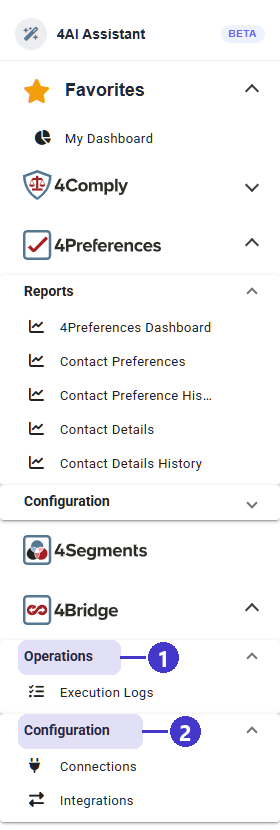
- Operations, which holds Execution Logs, the read-only record of every run.
- Configuration, which holds Connections and Integrations. Tasks are not a menu entry of their own: they live inside the integration they belong to.
TODO(review): the dashboard source declares four more 4Bridge screens that the menu does
not show and that do not work in the current build. 4Bridge Dashboard
(/bridge-dashboard) renders, but three of its four counters come from an endpoint that
returns 500, and its Recent Activity panel is sample text written into the component
rather than real data. Webhooks (/bridge-webhooks), Notifications
(/bridge-notifications) and Connector Metadata (/bridge-connector-metadata) each
call a path the API does not serve and get a 404, so all three show an empty state
whatever your tenant holds. Confirm whether these ship or are withdrawn before this page
mentions them at all.
The order to build things in
Each step depends on the one above it, so working out of order means going back.
- A connection for each system. At least two, since an integration pairs two of them. Test each one before you save it: the wizard will not let you save an untested connection. See Connections.
- An integration. Pick the two connections it links and give it a name. See Integrations.
- A task inside that integration. This is where the real decisions are: which direction, which object, which fields map to which, what to do with a record that already exists, and when to run. See Tasks and execution.
- Run it once by hand and read the execution log before you put it on a schedule. See Execution logs.
What you need to be allowed to do this
4Bridge has three permissions of its own on the Roles tab of Settings, described in Users. The role a person holds decides which they get.
| Permission | Its own description | What it covers |
|---|---|---|
| View integrations | Connections, tasks and execution logs | reading every 4Bridge screen |
| Manage integrations | Create and run connections and tasks | creating, editing, enabling, deleting, and running a task now |
| Manage connection credentials | Add or replace the secrets 4Bridge connects with | entering or replacing the credentials on a connection |
The third is marked SENSITIVE on the Roles tab, and it deserves the badge: the credentials on a connection are standing access to a system outside 4Comply.
On the Roles tab the product groups the first two under INTEGRATIONS and the third under CREDENTIALS, and its one-line summary of the whole product is Integrations, connections and execution logs.
TODO(review): the API checks the older admin and config roles on every 4Bridge write,
not these three permissions. Confirm which is authoritative, because a role that grants
Manage integrations without being admin or config would be refused by the API.
For developers
Every screen in 4Bridge is also an API call, under the single route prefix
/v1/4bridge/. Start at API getting started.